If you have an old fax machine in Panama, do not throw it away or hand it over with documents still inside. First identify the device, check whether it can be powered on safely, preserve any records you need, and clear the data that the model may store. You can then decide whether to keep using it, offer it for donation, or find responsible end-of-life handling if it is too damaged.
A stand-alone fax, a fax-enabled multifunction printer, and an older thermal-paper machine do not store the same information or use the same supplies. There is no universal procedure that works for every one of them. This guide helps you make a sound decision without promising that every unit will be accepted or asking you to open the device.
Quick answer: four possible paths
The right path depends on the fax machine's actual condition:
- Keep it in service. It may still be useful when an office receives documents over a telephone line and the machine operates reliably.
- Reuse it as a printer, scanner, or copier. Many multifunction units retain those features even when you no longer fax.
- Offer it for evaluation as a donation. If it is complete, safe to transport, and may have practical or learning value, ask Crezendo first.
- Handle it as electronic waste. If it is severely damaged and no reuse path exists, responsible recycling is the last step. Ask an authorized handler directly what it accepts and how the item should be delivered.
If the device is actually a document digitizer without fax capability, see the guide on what to do with an old document scanner.
Identify the device before moving it
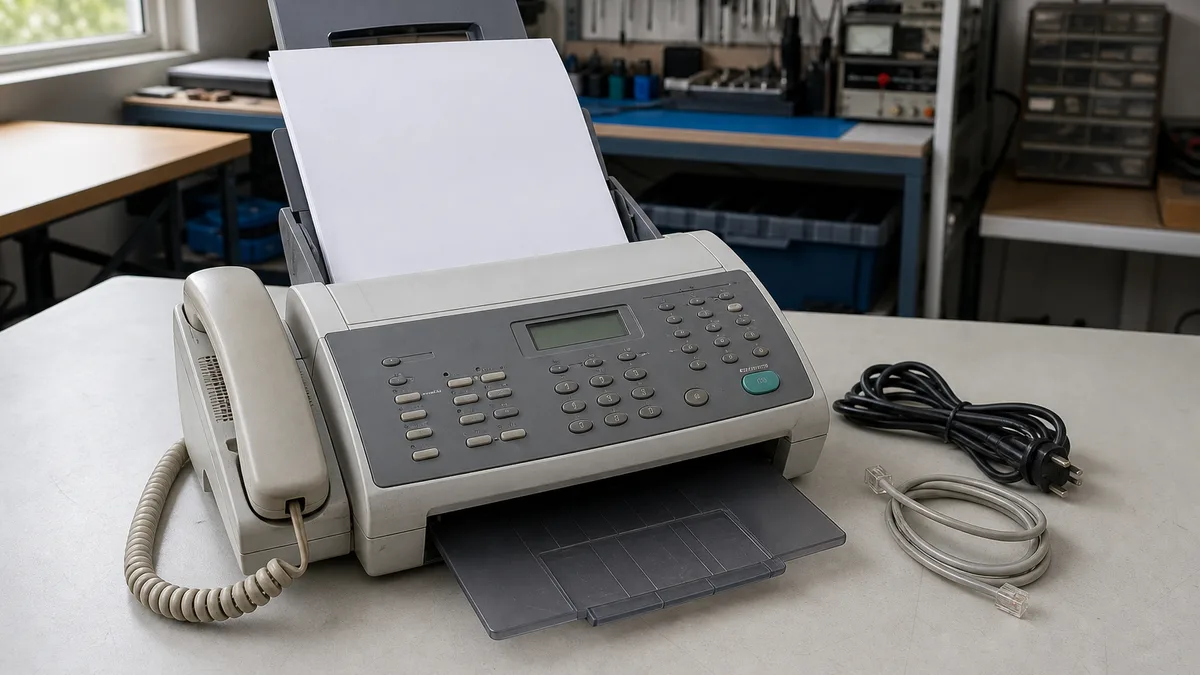
Find the brand and model on the exterior label and take a readable photograph. That detail lets you locate the official manual and describe the unit without guessing. Without disassembling anything, determine:
- whether it is a dedicated fax or a multifunction printer;
- whether it uses thermal paper, ink, or toner;
- whether it includes a handset, trays, power cord, external adapter, or telephone cable;
- whether it has Ethernet, Wi-Fi, USB, card readers, or internal storage;
- whether manuals, software, or identified supplies remain with it;
- whether the display shows an error code, jam, or memory warning.
Do not plug it in merely to “see if it still works” when the cord is frayed, the plug is deformed, liquid entered the device, there is a burnt smell, it became unusually hot, or loose parts rattle inside. Disconnect it if it was already connected and describe the condition when asking for guidance. A possible donation never justifies an unsafe test.
Decide whether it still has a useful function
An old fax may still address a specific need. Before retiring it, ask who uses it, why, and how often. If important documents still arrive through it, plan the transition: confirm that an alternative exists, preserve needed numbers, and avoid unexpectedly interrupting an administrative process.
On a multifunction device, test only safe and relevant functions. Making a local copy can help check the feeder and print mechanism without transmitting information. The scanner or printer may have more practical value than the fax modem. Avoid buying supplies until you know whether you will keep the machine: identify the model, the fault, and the actual availability of parts first.
The complete unit may also have learning value for observing mechanical paper handling, product design, or the evolution of communications. That does not mean it should be taken apart at home. Internal repair or parts recovery belongs with people who have the appropriate knowledge and tools.
Protect documents, contacts, and settings
This is the most important step. Some fax machines retain only basic settings; others can store received images, pending jobs, speed-dial numbers, address books, logs, sender identification, or network settings. Brother's official documentation on reset functions shows why the exact model matters: one reset option may delete stored faxes while another leaves the address book and history in place.
Use this order:
- Remove every original and copy. Check the feeder, output tray, accessible paper path, and any folders stored beside the machine.
- Preserve required records. Print or export only what you must retain for operational or legal reasons, then store it in a controlled location.
- Cancel pending work. Check scheduled faxes, retries, private reception, forwarding, and stored documents.
- Clear contacts and histories. Remove speed dials, groups, names, numbers, call history, and fax journals when the menus provide those options.
- Delete saved faxes. HP explains that Clear Saved Faxes can also delete unsent, scheduled, or forwarding-pending jobs, so inspect what is present before confirming.
- Reset it using the official manual. Follow the exact procedure for the brand and model. Do not assume that turning it off or unplugging it erases memory.
- Verify after restart. Check that your contacts, fax header, logs, credentials, and network details are gone. Some models require separate resets for different categories.
If you cannot access the menu, have forgotten the administrator password, or the unit will not power on, do not claim that the data was erased. Disclose that limitation before donating. For devices with a hard drive or removable storage, use the manufacturer's security guide or qualified technical assistance; do not remove components blindly.
Prepare the fax machine without damaging it
Simple preparation makes evaluation easier and prevents loss:
- shut it down normally and unplug it;
- remove paper, originals, and documents from the surrounding area;
- keep the power cable, adapter, handset, and phone cable together;
- secure trays and lids without sticking tape directly to delicate surfaces;
- put small accessories in a labeled bag with the brand and model;
- note whether it powers on, prints, copies, scans, or shows an error;
- state whether data clearing was completed or remains pending;
- transport it upright, protected from rain and impact.
Do not pack leaking cartridges, spilled toner, or loose thermal paper inside the same container. If a supply is damaged, describe it and ask how to handle it. Do not send real documents as test pages either; a fresh sheet without private information is enough to explain a test.
How to ask Crezendo about a donation
Before transporting the fax machine, visit Donate Technology to Crezendo. Share the brand, model, photographs, general location, accessories, and known condition. Be direct if the unit does not power on, shows an error, or could not be fully cleared. This allows Crezendo to confirm whether it fits the current scope and agree on the next step without an unnecessary trip.
Do not assume pickup, an address, business hours, a certificate, or a specific destination for the device. Acceptance and logistics must be confirmed in the conversation. For several office devices, prepare a simple inventory with one row per unit.
A fax machine may be part of a broader technology donation. If you are organizing larger infrastructure, see where to donate old servers in Panama. If retiring the telephone service also leaves networking equipment unused, the guide on what to do with an old router explains how to treat its credentials and configuration.
What if it is incomplete or does not work?
A nonworking fax is not automatically household trash, but it is not automatically useful as a donation either. Document the symptom without opening the machine: it does not start, jams paper, prints defects, cannot detect the line, or lacks its adapter. Photograph the label and connectors. Crezendo can tell you whether evaluating it fits the current scope.
If the unit is wet, burnt, severely corroded, dangerously broken, or contaminated, keep it disconnected and minimize handling. If no reuse route exists, consult the relevant authority or an authorized electronics-waste handler in Panama and verify that it accepts this type of equipment and its supplies. Do not leave the fax on the street or put the complete device in household trash.
Final checklist before handoff
- I identified the brand and model.
- I removed originals, copies, and forgotten paper.
- I preserved the records I genuinely need.
- I canceled jobs and cleared available faxes, contacts, and histories.
- I followed the model's official reset procedure and verified the result.
- I separated and labeled cables, adapters, and accessories.
- I recorded faults or safety concerns without hiding them.
- I confirmed acceptance and logistics before moving the device.
The best destination for an old fax machine is chosen with information, not promises. If the unit is safe and may retain value, tell Crezendo what you have and ask about donating it. If it does not fit, you will already have the model, condition, and data protection handled so you can choose the next option responsibly.