A business WiFi network is not secure just because its password was changed once. The point of sale, computers, cameras, printers, phones, and customer devices may share the same equipment, but they should not necessarily have the same access. The right configuration depends on the model, firmware, internet provider management, and systems the business must keep operating.
This guide, reverified on August 10, 2026 against primary sources, provides a defensive path for a small business in Panama. It does not replace the manufacturer's manual, a professional review, payment-provider requirements, or a compliance assessment. It also does not promise absolute security: a network needs an inventory, configuration, testing, maintenance, and a planned response to incidents.
Quick answer: the safe sequence
Do not begin by changing random options. Follow these gates:
- identify devices, owners, and everything that must keep working;
- confirm who manages the router and whether the business or provider owns it;
- back up the configuration and prepare a change window with recovery;
- update through the official channel and verify that the equipment remains supported;
- protect the administrator account and turn off internet-side management when it is unnecessary;
- use WPA3 when clients support it, or WPA2 with AES/CCMP during a justified transition;
- separate business, guest, and IoT access, then prove the isolation works;
- disable unnecessary functions such as WPS, UPnP, or undocumented forwarding;
- test the point of sale, cameras, printers, allowed access, and denied access;
- record the result and define reviews around events, alerts, and manufacturer support.
If you cannot explain how to recover access or reverse a change, you are not ready to apply it during business operations.
1. Build an inventory before opening the router panel
The NIST Cybersecurity Framework 2.0 Small Business Quick-Start Guide begins by treating cybersecurity as a business risk. For WiFi, that means knowing what depends on the network before changing it.
Record the following without storing passwords in the sheet:
| Item | What to document | Control question |
|---|---|---|
| modem, router, and access points | make, model, firmware, owner, and responsible person | Is it managed by the business or ISP? |
| checkout or point of sale | connection, provider, and critical hours | Which contractual requirement applies? |
| cameras and recorder | connection, viewing, recording, and alerts | Will they continue working after a network change? |
| printers and scanners | users and required services | Do they need local communication? |
| work computers and phones | owner, system, and function | Are they managed and updated? |
| IoT | type, support, and internet destination | Must it reach the business network? |
| guests and personal devices | purpose and access duration | Do they need only internet access? |
| vendors | access method, validity, and owner | Is there remote access to remove? |
An unfamiliar name in the router list does not prove an intrusion. Names may be generic, and some devices use randomized MAC addresses. Confirm the owner, time, manufacturer, and purpose before blocking something critical.
2. Establish ownership, backup, and a change window
A provider-supplied router may have shared controls or remotely managed firmware. Before changing it, confirm which options the business controls and which require the ISP. Do not factory-reset equipment without knowing the credentials for internet access, telephony, IPTV, business links, or related services.
When the manufacturer supports it, export the current configuration and store it with restricted access: that file may contain network names, keys, or other secrets. Also document:
- how to regain access to the administration panel;
- who can approve a change;
- which services will be checked afterward;
- how long the business can tolerate an outage;
- how to restore the earlier state;
- where to escalate if recovery fails.
Make changes during an agreed window. Changing the WiFi passphrase or segmenting networks may disconnect payment, camera, and printing systems. Having a backup is not enough: the restoration procedure must be understandable and, where practical, tested.
3. Check support and update through the authorized channel
NIST IR 8425A on consumer-grade routers recognizes that some small businesses use this equipment, but it evaluates product capabilities; it does not say that every home router is suitable for a business. Important outcomes include verified updates, interface access control, credential protection, and state awareness.
Find the exact model on the manufacturer's official website or app, or consult the ISP. Review:
- installed and available versions;
- end-of-support date;
- security and compatibility notes;
- update method and expected restart;
- whether configuration is preserved;
- documented recovery after a failed update.
Do not download firmware from forums, unofficial repositories, or a page for a similar model. If the device no longer receives security fixes, a longer password does not solve the problem: consider equipment that has support and the capabilities the architecture requires.
4. Protect administration, not only the WiFi key
The password for the management panel and the passphrase that connects devices are different secrets. Do not reuse them. The FTC's small-business cybersecurity guidance recommends changing default credentials, turning off remote management, and signing out of the administrator account.
Apply what the equipment supports:
- an individual administrator account or a long, unique passphrase stored in a controlled password manager;
- MFA for a cloud or management account when available;
- administration from the LAN or a defined management network;
- HTTPS or another encrypted protocol, avoiding HTTP or Telnet when a secure alternative exists;
- failed-attempt limiting or lockout;
- sign-out after administration;
- immediate removal of former employee and expired vendor access.
NIST IR 8425A recommends disabling administrative access from the WAN by default and confining management to local interfaces. If a real need requires remote management, do not expose the panel directly to the internet for convenience: it requires an authenticated, encrypted, restricted, logged, and maintained design operated by someone competent.
Changing a default network name can avoid revealing a model or provider. Hiding the SSID does not replace encryption or authentication and should not be presented as a primary defense.
5. Choose WPA3 or a deliberate WPA2 transition
Wi-Fi Alliance documents WPA3 as the generation after WPA2. WPA3-Personal uses SAE and requires Protected Management Frames. However, both the access point and every necessary client must be compatible.
Use this decision path:
- WPA3-Personal only: preferred when all required equipment supports it and testing is stable.
- WPA2/WPA3 transition mode: useful during migration, with the understanding that WPA2 clients still connect and the network is not WPA3-only.
- WPA2 with AES/CCMP: a minimum baseline for legitimate hardware that does not yet support WPA3 while replacement or isolation is planned.
- Open, WEP, legacy WPA, or TKIP: not acceptable choices for the business network.
Use a long, unique passphrase that does not contain the business name, phone number, address, or predictable words. There is no universal rotation calendar. Change it when someone who knew it loses authorization, it was shared through the wrong channel, exposure is suspected, or business policy requires it. Plan the rotation because every authorized client will have to reconnect.
For a company with frequent onboarding and offboarding or a need for individual identity, WPA3-Enterprise or WPA2-Enterprise with 802.1X/RADIUS may be worth a professional assessment. It is not a magic switch: it requires infrastructure, certificates or identities, operations, and skills that must be designed separately.
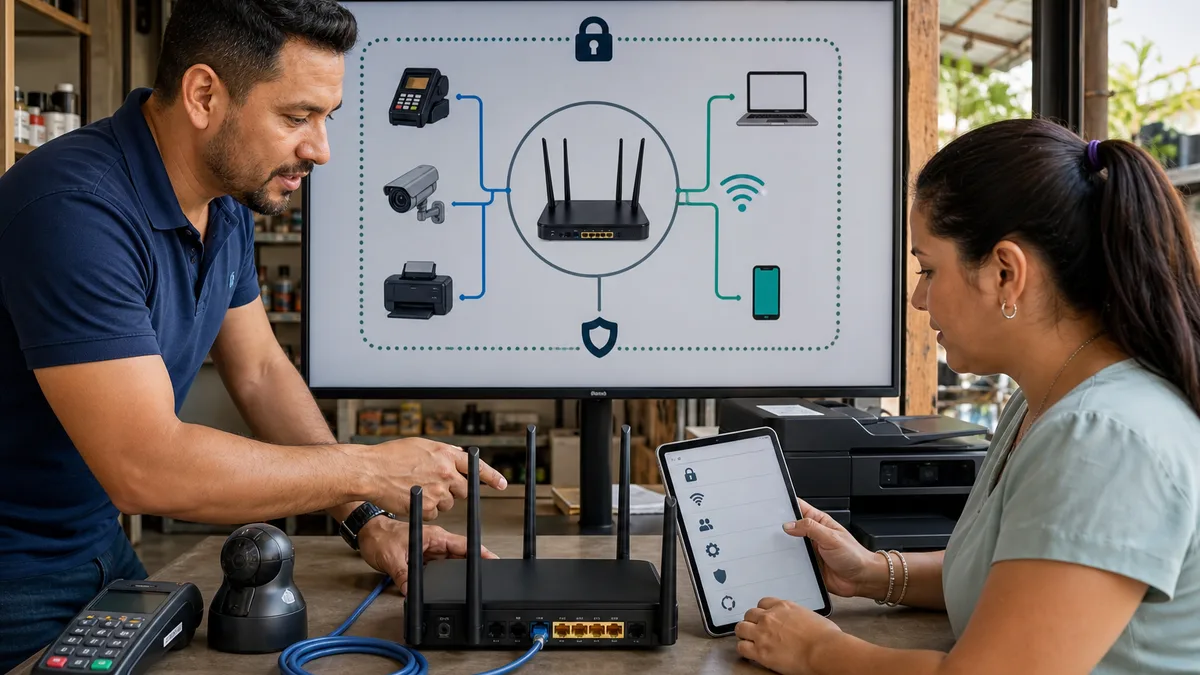
6. Separate business, guests, IoT, and payments
The FTC recommends limiting the primary network to business-managed devices and placing guests, the public, and personal devices on a separate network. An initial small-business model can be:
| Zone | Examples | Expected access |
|---|---|---|
| business | managed computers and phones | internet and required internal resources |
| guests | customers, visitors, and personal devices | internet, without management or internal access |
| IoT | cameras, printers, displays, and sensors | only required destinations and crossings |
| payments | terminals or checkout, when the design requires it | according to the provider and applicable contracts |
Multiple SSIDs do not prove segmentation. Some routers place different names on the same network. From a guest device, verify that it cannot open the management panel, discover printers, reach cameras, or communicate with business clients when the design prohibits that access.
A guest network, client isolation, VLANs, and firewall rules are different mechanisms. If the equipment cannot enforce the required isolation, narrow the scope, connect a critical device by wire, or evaluate manageable hardware. Do not simulate security with network names.
7. Reduce functions and access without an owner
Current CISA guidance for enhanced visibility and hardening of communications infrastructure recommends maintaining inventory and firmware, using secure authentication and protocols, and disabling unnecessary or plaintext services. Review at least:
- WPS;
- UPnP;
- internet-side management;
- port forwarding;
- a configured “DMZ host”;
- legacy FTP, Telnet, HTTP, or SNMP services;
- cloud accounts, integrations, and support access;
- old networks that are still being advertised.
CERT/CC documented a design weakness in WPS PIN authentication. Disable it unless there is a justified need and current documentation demonstrating how that implementation is protected.
Do not disable a function before investigating dependencies: UPnP or a port may support telephony, cameras, or another application. The correct process is to identify purpose and ownership, back up, change, test, and record. If nobody can explain an exposure, it should not remain merely through inertia.
8. Treat checkout, cameras, and printers as separate systems
Checkout and payment terminals
Follow the acquirer, bank, processor, integrator, or point-of-sale provider documentation. Do not modify a terminal, intercept its traffic, or scan it without authorization. Segmentation may reduce exposure, but it does not prove PCI DSS or contractual compliance. After a change, verify authorized sales, closeout, printing, and provider communication.
Cameras and recorders
Change default credentials, use individual accounts when supported, update firmware, and limit external access. Segmentation must preserve recording, time, alerts, and authorized viewing. An unsupported camera or one exposed directly to the internet needs remediation or replacement, not only another SSID.
Printers, displays, and other IoT
Review the management panel, updates, and discovery services. Permit only the communication the workflow requires. Some printers need access from the business network; document that exception instead of opening the entire IoT zone.
Default configurations and credentials on connected devices are a recurring source of exposure. Include every device in the inventory and support review.
9. Prove that the configuration works
NIST SP 800-153 relates WLAN security to its components across the entire lifecycle, including assessment and monitoring. Before closing the change window, preserve evidence without publishing secrets:
| Test | Acceptable result |
|---|---|
| panel access from guests | blocked |
| guest access to internal resources | blocked |
| internet for guests | works according to policy |
| IoT → business communication | blocked except documented exceptions |
| security mode per client | matches WPA3 or the approved transition |
| old or open SSIDs | removed or justified |
| checkout, cameras, and printers | essential flow tested |
| management from WAN | disabled unless explicitly designed |
| recovery and contacts | documentation available to responsible staff |
Do not declare the network secure merely because everyone has internet access. Testing must include access that is supposed to fail.
10. Maintain the network through events and ownership
A monthly review may be useful, but it is not a universal frequency. Assign owners and also review the network after any of these events:
- employee or vendor onboarding and departure;
- installation of a new device;
- manufacturer alert or security notice;
- firmware update;
- ISP or access-point change;
- a password shared through the wrong channel;
- a confirmed unknown device;
- an outage or unusual behavior;
- a change to payment, camera, or other critical systems.
The minimum record should include the date, owner, firmware, authorized devices, changes, tests, and open actions. Protect configuration backups and logs. Review whether the manufacturer still provides fixes; unsupported equipment should enter a replacement plan.
WiFi is only one part of the system. Strengthen email and accounts with the guide to basic cybersecurity concepts: MFA, individual accounts, updates, and a reporting path remain necessary even when the wireless configuration is sound.
What to do about a suspicious device or change
Do not destroy evidence or immediately reset everything. Record the time, displayed name, identifying address, management screenshots, and observed changes without distributing secrets. Confirm that it is not an authorized device or randomized MAC address.
If unauthorized access is confirmed:
- isolate the device or affected zone if doing so will not endanger a critical operation;
- change exposed management and WiFi credentials from a trusted device;
- revoke unnecessary remote access and sessions;
- review firmware, configuration, forwarding, DNS, and linked accounts according to manufacturer guidance;
- verify checkout, cameras, data, and business accounts;
- preserve logs and seek professional incident response when payments, data, or persistent access may be involved.
Notification and escalation duties depend on the incident, data, contracts, and applicable regulation. This guide cannot decide those obligations for you.
When is a home router no longer enough?
The answer does not depend only on employee count. Ask whether the equipment can:
- receive updates and show a support date;
- separate zones with testable rules;
- provide secure administration and useful records;
- handle device count, coverage, and concurrency reliably;
- provide accounts or controls suited to authorized people;
- support the operation and recovery the business requires.
If it cannot isolate guests, IoT, or payments; no longer receives patches; depends on insecure remote administration; or cannot handle the load, evaluate another architecture. Brand, price, or the “WiFi” generation alone does not satisfy these requirements.
If useful hardware is being replaced, review how to donate old network routers and switches or give a used WiFi repeater a second life. Do not donate equipment with live configuration or credentials: reset it in a controlled way after preserving what the operation needs and confirming it is no longer in service.
How Crezendo can help, within clear limits
Crezendo offers a cybersecurity awareness workshop for non-technical staff. It can cover decisions involving phishing, passwords, MFA, data care, remote work, networks, updates, and initial reporting through situations relevant to the team.
It is an educational activity. It does not include router installation, VLAN design, WiFi configuration, vulnerability audits, penetration testing, compliance certification, or professional incident response by default. A specialized IT scope must be defined and contracted separately with an appropriate professional.
Frequently asked questions
Is WPA2 or WPA3 better?
WPA3-Personal is preferred when the access point and every necessary client support it. WPA2 with AES/CCMP may be a transition for legitimate incompatible hardware. Test what each device negotiates and avoid WEP, legacy WPA, TKIP, and open networks.
How often should I change the WiFi password?
There is no universal interval. Rotate it when authorization changes, it was shared improperly, exposure is suspected, or policy requires it. Plan to reconnect every critical device.
Does a guest network actually protect the business?
Only if it is isolated. Verify that a guest receives the intended internet access but cannot open the panel, see internal devices, or communicate with prohibited zones.
Should I disable WPS?
Yes, as a prudent business default, especially PIN mode. CERT/CC documented its susceptibility to brute force. If a modern implementation is necessary, validate its controls and support with the manufacturer.
Can I tell whether an unknown device is an intruder?
The router list is a signal, not a conclusion. Check manufacturer, time, owner, purpose, and randomized addresses. If you confirm it is unauthorized, isolate it, preserve evidence, and review credentials and configuration.
Does segmentation guarantee that a payment system complies with PCI DSS?
No. It may reduce scope or exposure, but compliance depends on architecture, provider, data, contracts, and applicable controls. Follow the acquirer and obtain a competent assessment.
Does Crezendo configure my company's network?
The confirmed offering is an awareness workshop for non-technical staff, not a network installation or audit service. Contact is for assessing an educational scope; technical implementation requires a qualified provider and separate scope.
Turn the guide into a verifiable exercise
Begin with an inventory and a small test, not an impulse purchase or changes during critical hours. Define what must work, which access must be denied, who approves, how to reverse the change, and what evidence will close the task.
If your company wants to strengthen staff decisions around passwords, networks, updates, data, and initial reporting, share the roles, devices, and priority situations to assess an awareness workshop with a clear scope.