Where to donate a used MIDI keyboard in Panama: what to check first
A MIDI keyboard or controller you no longer use may still be useful for making music, learning digital production, or experimenting with software and hardware. Before donating it, however, identify what the device actually is, what it needs to work, and what condition it is in.
If you want to ask Crezendo about a donation, send the equipment details first. An inquiry does not mean automatic acceptance and does not guarantee repair, pickup, delivery to students, or use in a particular program. Model, compatibility, condition, accessories, and current needs determine whether the device has a reasonable second life.
First: is it a MIDI controller, digital keyboard, or synthesizer?
“MIDI keyboard” is used for several different kinds of equipment. Identifying the type prevents incorrect expectations:
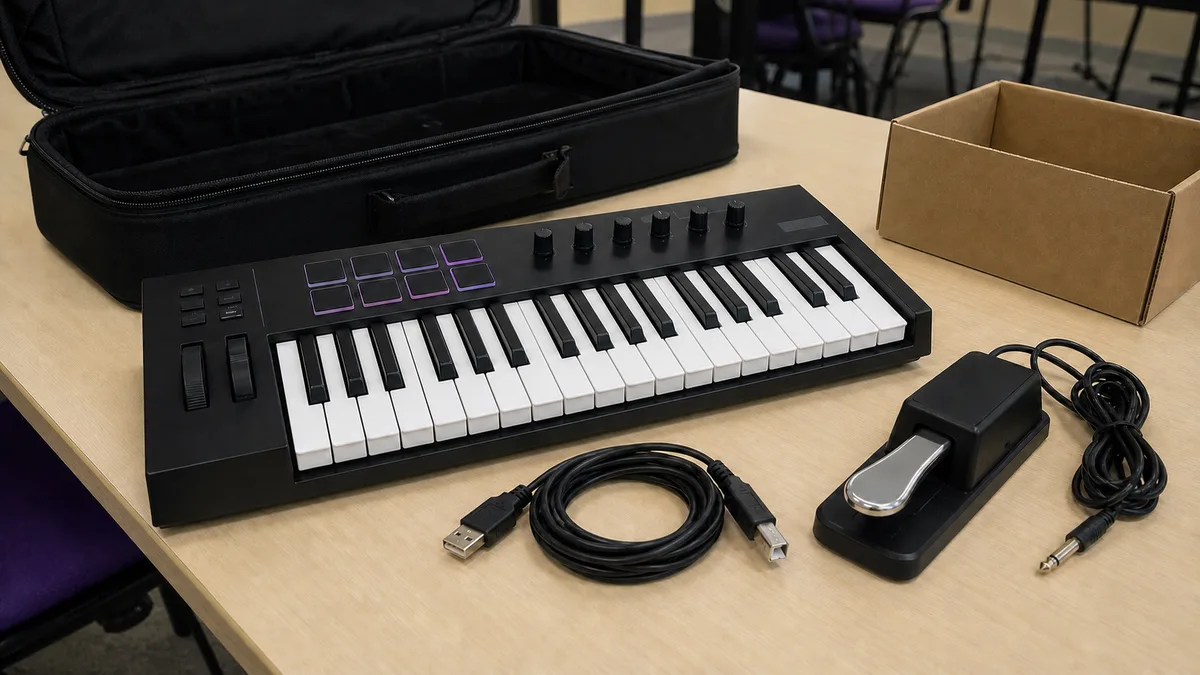
- USB MIDI controller: normally sends notes and controls to a computer or other device and may not produce sound by itself.
- Controller with MIDI DIN: uses traditional 5-pin MIDI connectors and may require a suitable interface for connection to a computer.
- Digital keyboard with MIDI: works as an instrument and may also send or receive MIDI data.
- Synthesizer or workstation: can produce sound on its own and, depending on the model, may include MIDI, storage, sequencing, or other functions.
- Pads, control surfaces, and compact controllers: serve a similar purpose even without a conventional keyboard.
Photograph the model label and do not describe a controller as a “synthesizer” merely because it has keys. That distinction matters to whoever may reuse it.
What to check before offering it
You do not need to disassemble the equipment. An exterior inspection and basic test are enough for an initial inquiry.
If you can do so safely, check:
- whether it powers on or is detected by a compatible computer;
- whether keys respond and return normally;
- whether pads, wheels, knobs, faders, and buttons work reasonably;
- whether the USB port is firm and does not require moving the cable to maintain connection;
- whether visible MIDI connectors are in good condition;
- whether the display, when present, works properly;
- whether you still have the original power supply or an adapter whose compatibility has been verified;
- whether a USB cable, pedal, stand, or other useful accessories are included;
- whether there are impacts, liquid damage, corrosion, a burnt smell, loose connectors, or known repairs.
Do not connect a “similar-looking” power supply without checking the voltage, current, polarity, and connector type specified by the manufacturer. A plug that physically fits can still be electrically wrong.
Software compatibility matters
An old controller can be physically perfect yet depend on drivers, software, or operating systems that are no longer commonly used. Other devices work through MIDI or USB standards without a dedicated driver.
Before deciding that a device “no longer works”:
- identify the exact brand and model;
- review any official documentation still available;
- note which connection it uses: USB, MIDI DIN, USB host, or another interface;
- if you tested it, say which computer and operating system you used;
- do not promise compatibility with Windows, macOS, Linux, iPad, Android, or a particular DAW unless you verified it.
You also do not need to buy software merely to prove that a controller has value. For an initial assessment, an honest description of what you know and what you could not test is enough.
Which accessories should stay with the equipment?
The correct accessories can make reuse much easier. If you still have them, identify:
- the original power supply;
- the appropriate USB cable;
- proprietary adapters;
- a sustain or expression pedal;
- manuals or documentation;
- a stand, music rest, or case;
- old installation media only when it legally belongs with the device and remains useful.
Do not buy missing accessories solely to make the device donatable. First ask whether the equipment has a reuse path and which part, if any, would actually be necessary.
Do I need to erase anything before donating it?
A simple MIDI controller normally does not store the same kind of personal information as a phone or laptop, but some keyboards, synthesizers, and workstations can store presets, projects, sequences, samples, user names, networks, or information in internal or removable memory.
If your equipment has storage or smart features:
- remove USB drives, memory cards, and other media that belong to you;
- back up projects or presets you want to keep;
- check the manufacturer's manual before performing a reset;
- remove personal accounts or connections when the model uses them;
- do not erase firmware, factory content, or transferable licenses without understanding the effect.
If the unit is merely a controller with no storage, do not invent a “secure wipe” process the device does not need.
Does it make sense to donate a MIDI keyboard with faults?
It may, but describe the fault before spending money or transporting the device.
Useful descriptions include:
- “powers on, but three keys do not respond”;
- “the computer detects it, but the USB port is loose”;
- “I do not have the power supply and could not test it”;
- “MIDI DIN works, but I do not know whether USB is compatible with current systems”;
- “one pad responds intermittently.”
Do not assume that a fault automatically makes the device useful for training or parts. Do not assume the opposite either: a localized problem may still be worth assessing. Crezendo should confirm the case before receiving it.
How to ask Crezendo about a donation
To reduce back-and-forth, prepare:
- exact brand and model;
- general photographs and a photo of the label;
- device type and connections;
- known functional condition;
- included accessories;
- faults or damage;
- approximate dimensions if it is large or heavy;
- your general location for logistics assessment.
Send that information through Crezendo's donation page. Wait for confirmation before transporting the equipment. Do not assume a delivery point, home pickup, repair, or final destination until coordination confirms it.
What other options exist if donation is not a fit?
If the equipment works, you can also keep using it, sell it, or give it to someone who understands its compatibility. With an older controller, an accurate technical description is more useful than saying it “works with everything.”
If it is badly deteriorated and has no reasonable second life, consider an appropriate electronics-waste route. Equipment with a damaged internal battery, burnt power supply, or compromised electrical parts requires more care than a controller that is merely obsolete.
For the broader decision between reuse, donation, and end-of-life handling, see where to donate electronics and when to consider recycling in Panama.
Frequently asked questions
Does Crezendo accept every MIDI keyboard?
Do not assume so. Send the brand, model, condition, photographs, and accessories so the case can be assessed before transport.
Can I donate a MIDI keyboard that does not power on?
You can ask, explaining that it could not be tested and whether you still have the correct power supply. An inquiry does not guarantee acceptance or repair.
Do I need to include a computer or software?
No. A controller can be assessed separately. Do not hand over licenses, accounts, or computers you did not intend to donate merely to complete the setup.
What if I no longer have the USB cable or power supply?
Say so. Do not buy a replacement before confirming that it is necessary and compatible.
Can an old MIDI keyboard still work with current software?
It depends on the model and connection method. Some use broadly compatible standards; others depend on specific drivers or software. Check manufacturer documentation and avoid promising universal compatibility.
A useful donation begins with precise information
A MIDI keyboard may be a simple peripheral or a complex digital instrument. The more accurately you identify the device, its condition, and its accessories, the easier it is to decide whether to keep using it, transfer it, assess it for donation, or choose another route.
If you already have those details, send them to Crezendo to ask about a possible donation before moving the equipment.